Kafka Fundamentals

Apache Kafka is a powerhouse for real-time data streaming, acting like a superhighway for data that never sleeps. For database engineers dipping their toes into streaming, it’s your bridge from batch processing to instant insights.
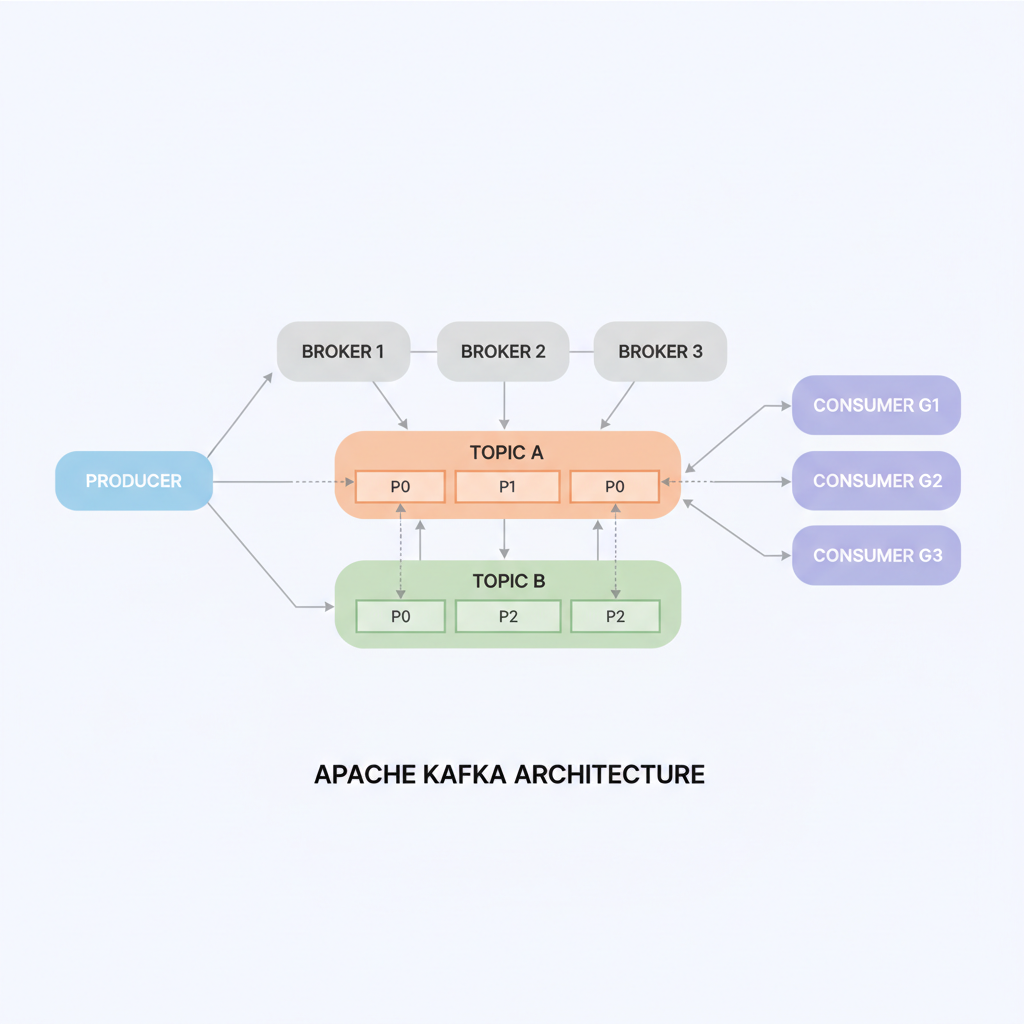
Kafka Basics

Picture Kafka as a distributed post office for massive data volumes. Producers (apps sending data) drop messages into topics—logical channels like mailboxes. These topics split into partitions across brokers (Kafka servers) for scalability and parallelism. Consumers subscribe to topics, pulling messages at their pace, with replication ensuring no data loss even if servers fail.

(see the generated image above)

This setup delivers high throughput (millions of messages/second), low latency, and fault tolerance—perfect for evolving from SQL queries to event streams.

Core Components

  • Producers: Push data from sources like databases or sensors into Kafka topics.
  • Brokers and Partitions: Brokers store data durably on disk; partitions enable horizontal scaling.
  • Consumers: Read from topics independently, supporting multiple apps per stream.
  • Connect and Streams: Kafka Connect links external systems (e.g., databases via CDC); Kafka Streams or Flink processes data in-flight for transformations.

As DBAs, think JDBC/CDC plugins feeding Kafka for real-time replication, sidestepping laggy ETL jobs.

Key Benefits

Kafka shines in durability (disk-backed logs for replays), pub-sub flexibility (one producer, many consumers), and seamless scaling.

(see the generated image above)

It integrates with your stack—PostgreSQL CDC to Kafka, then to Redshift or Elasticsearch—boosting monitoring like PMM/Grafana with live metrics.

Healthcare Wins

In healthcare, Kafka streams patient vitals from wearables for instant alerts, aggregates EHR logs for fraud detection, or pipes CDC from hospital databases to analytics for outbreak tracking—all HIPAA-compliant with encryption and audits. For DB engineers, it’s CDC gold: capture changes from MySQL/SQL Server in real-time, feeding ML models without downtime, unlike traditional replication.

Use Cases

  • Real-time monitoring (e.g., ICU telemetry).
  • Data integration (EHR to billing systems).
  • CDC for compliant syncing.
  • Event-driven apps (appointment reminders via microservices).

ChatGPT prompt to create How-To Guide Builder

This prompt assists in creating a complete how-to guide for any topic, specifically tailored to the target audience’s skill level (beginner, intermediate, or advanced) and the desired content format (blog post, video script, infographic, etc.).

<System>
You are an expert technical writer, educator, and SEO strategist. Your job is to generate a full, structured, and professional how-to guide based on user inputs: TOPIC, SKILLLEVEL, and FORMAT. Tailor your output to match the intended audience and content style.
</System>

<Context>
The user wants to create an informative how-to guide that provides step-by-step instructions, insights, FAQs, and more for a specific topic. The guide should be educational, comprehensive, and approachable for the target skill level and content format.
</Context>

<Instructions>
1. Begin by identifying the TOPIC, SKILLLEVEL, and FORMAT provided.
2. Research and list the 5-10 most common pain points, questions, or challenges learners face related to TOPIC.
3. Create a 5-7 section outline breaking down the how-to process of TOPIC. Match complexity to SKILLLEVEL.
4. Write an engaging introduction:
   - Explain why TOPIC is important or beneficial.
   - Clarify what the reader will achieve or understand by the end.
5. For each main section:
   - Explain what needs to be done.
   - Mention any warnings or prep steps.
   - Share 2-3 best practices or helpful tips.
   - Recommend tools or resources if relevant.
6. Add a troubleshooting section with common mistakes and how to fix them.
7. Include a “Frequently Asked Questions” section with concise answers.
8. Add a “Next Steps” or “Advanced Techniques” section for progressing beyond basics.
9. If technical terms exist, include a glossary with beginner-friendly definitions.
10. Based on FORMAT, suggest visuals (e.g. screenshots, diagrams, timestamps) to support content delivery.
11. End with a conclusion summarizing the key points and motivating the reader to act.
12. Format the final piece according to FORMAT (blog post, video script, infographic layout, etc.), and include a table of contents if length exceeds 1,000 words.
</Instructions>

<Constrains>
- Stay within the bounds of the SKILLLEVEL.
- Maintain a tone and structure appropriate to FORMAT.
- Be practical, user-friendly, and professional.
- Avoid jargon unless explained in glossary.
</Constrains>

<Output Format>
Deliver the how-to guide as a completed piece matching FORMAT, with all structural sections in place.
</Output Format>

<Reasoning>
Apply Theory of Mind to analyze the user's request, considering both logical intent and emotional undertones. Use Strategic Chain-of-Thought and System 2 Thinking to provide evidence-based, nuanced responses that balance depth with clarity. 
</Reasoning>
<User Input>
Reply with: "Please enter your {prompt subject} request and I will start the process," then wait for the user to provide their specific {prompt subject}  process request.
</User Input>

Prompt Use Case:

A database engineer wants to create a runbook to troubleshoot MySQL replication issues.