Kafka Fundamentals

Apache Kafka is a powerhouse for real-time data streaming, acting like a superhighway for data that never sleeps. For database engineers dipping their toes into streaming, it’s your bridge from batch processing to instant insights.
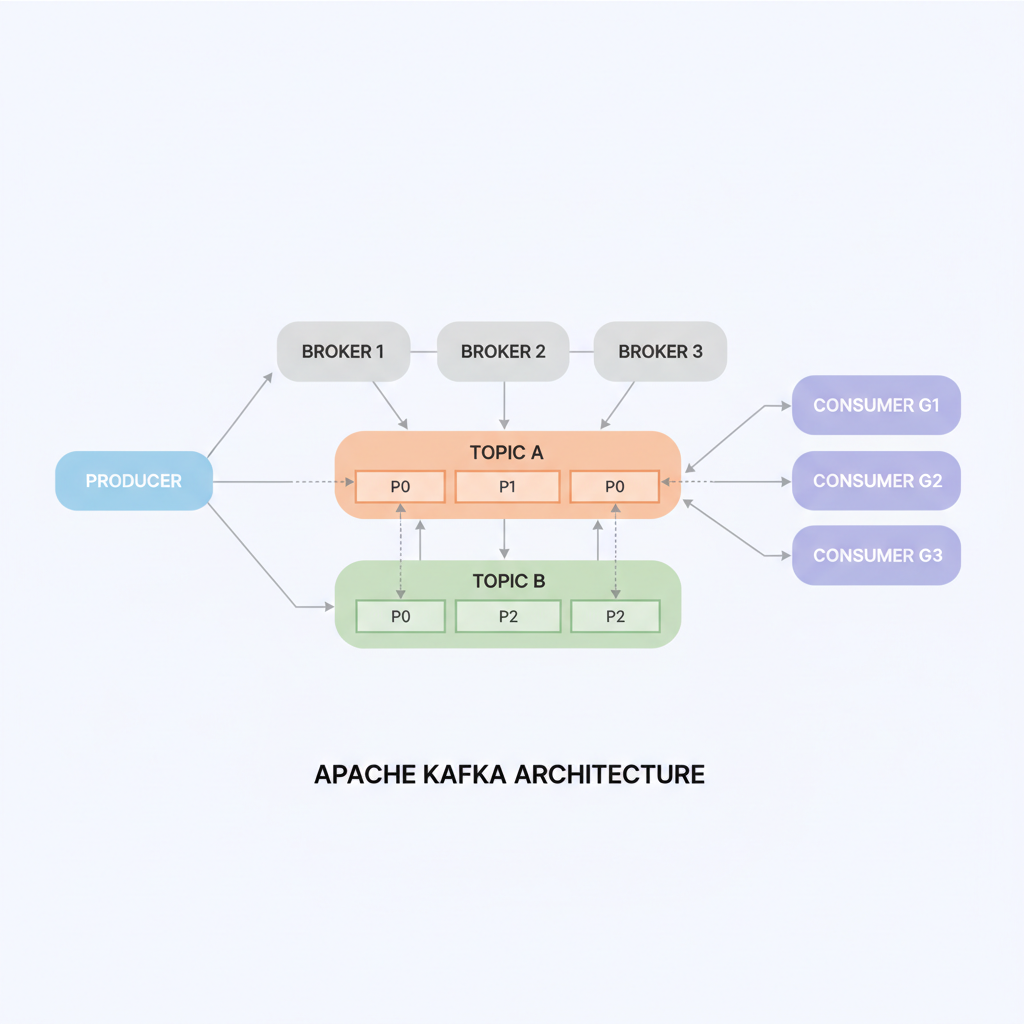
Kafka Basics

Picture Kafka as a distributed post office for massive data volumes. Producers (apps sending data) drop messages into topics—logical channels like mailboxes. These topics split into partitions across brokers (Kafka servers) for scalability and parallelism. Consumers subscribe to topics, pulling messages at their pace, with replication ensuring no data loss even if servers fail.

(see the generated image above)

This setup delivers high throughput (millions of messages/second), low latency, and fault tolerance—perfect for evolving from SQL queries to event streams.

Core Components

  • Producers: Push data from sources like databases or sensors into Kafka topics.
  • Brokers and Partitions: Brokers store data durably on disk; partitions enable horizontal scaling.
  • Consumers: Read from topics independently, supporting multiple apps per stream.
  • Connect and Streams: Kafka Connect links external systems (e.g., databases via CDC); Kafka Streams or Flink processes data in-flight for transformations.

As DBAs, think JDBC/CDC plugins feeding Kafka for real-time replication, sidestepping laggy ETL jobs.

Key Benefits

Kafka shines in durability (disk-backed logs for replays), pub-sub flexibility (one producer, many consumers), and seamless scaling.

(see the generated image above)

It integrates with your stack—PostgreSQL CDC to Kafka, then to Redshift or Elasticsearch—boosting monitoring like PMM/Grafana with live metrics.

Healthcare Wins

In healthcare, Kafka streams patient vitals from wearables for instant alerts, aggregates EHR logs for fraud detection, or pipes CDC from hospital databases to analytics for outbreak tracking—all HIPAA-compliant with encryption and audits. For DB engineers, it’s CDC gold: capture changes from MySQL/SQL Server in real-time, feeding ML models without downtime, unlike traditional replication.

Use Cases

  • Real-time monitoring (e.g., ICU telemetry).
  • Data integration (EHR to billing systems).
  • CDC for compliant syncing.
  • Event-driven apps (appointment reminders via microservices).

Azure PostgreSQL Flexible Server: Inactive Replication Slots Eating Your Storage (And How to Fix It)

Inactive replication slots in Azure Database for PostgreSQL Flexible Server can silently fill your disk with WAL files. Here’s how to spot, drop, and prevent them.

The Problem: WAL Explosion from Orphaned Slots

Replication slots ensure WAL retention so consumers (CDC tools, read replicas) don’t miss changes. Inactive slots—created by stopped CDC jobs, deleted replicas, or failed experiments—pin old WAL indefinitely, consuming storage until it fills. Azure Flexible Server has safeguards like auto-grow, but slots can still cause outages.

Spot the Culprits

Run these to identify storage hogs:

-- WAL retained by each slot (biggest first)
SELECT slot_name, plugin, slot_type, active, 
       pg_size_pretty(pg_wal_lsn_diff(restart_lsn, '0/0')) AS retained_wal
FROM pg_replication_slots
ORDER BY pg_wal_lsn_diff(restart_lsn, '0/0') DESC;
-- Current lag relative to WAL head
SELECT slot_name, 
       pg_size_pretty(pg_wal_lsn_diff(pg_current_wal_lsn(), restart_lsn)) AS lag_size
FROM pg_replication_slots;
-- Inactive slots only
SELECT * FROM pg_replication_slots WHERE NOT active;
-- Check active physical replication (HA/replicas)
SELECT pid, state, sent_lsn, replay_lsn, write_lag 
FROM pg_stat_replication;

Focus on inactive logical slots (slot_type='logical'active=false).

Clean Them Up Safely

Drop one by one—never active or Azure HA slots like azure_standby:

SELECT pg_drop_replication_slot('your_inactive_slot_name');

Storage recovers as WAL checkpoints recycle old segments (minutes to hours). Verify with Azure Metrics > Disk Used.

Prevention: Best Practices

PracticeActionWhy
Monitor slotsAlert on inactive slots >24h or WAL >20% diskCatches issues early 
Limit WAL retentionSet max_slot_wal_keep_size = '20GB' (PG13+)Auto-invalidates lagging slots 
Config for CDC/replicaswal_level=logicalmax_replication_slots >= replicas + CDC + 4 (HA)Reserves space 
Cleanup workflowDrop slot before stopping CDC job/replicaNo orphans 
Azure limitsCheck portal Server Parameters; monitor replicasHA needs ~4 slots 

Real-World Traps

  • CDC tools (Debezium, DMS, Fivetran) create per-task slots; drop on job stop.
  • Deleted read replicas leave slots; check Azure portal first.
  • HA failover recreates azure_standby; ignore it.