How do you check if logical replication is running on a postgres instance?

  1. Check if logical replication is enabled in the PostgreSQL configuration file:Open the PostgreSQL configuration file (postgresql.conf), usually located in the PostgreSQL data directory. Look for the wal_level parameter. Logical replication requires at least wal_level to be set to logical or replica. If it’s set to logical, then logical replication is enabled. You can find the location of the PostgreSQL data directory by querying the pg_settings system catalog table: SELECT name, setting FROM pg_settings WHERE name = 'data_directory';
  2. Check if logical replication slots are being used:Logical replication uses replication slots to keep track of the status of replication. You can check if any replication slots are in use by querying the pg_replication_slots system catalog table: SELECT slot_name, plugin, slot_type, database FROM pg_replication_slots; If there are slots with slot_type as logical, then logical replication is being used.
  3. Check if there are any active subscriptions:Logical replication involves publishers and subscribers. Publishers publish changes to the replication stream, and subscribers consume these changes. To see if there are any active subscriptions, you can query the pg_subscription system catalog table:SELECT * FROM pg_subscription; If there are subscriptions listed here, then logical replication is in use.
  4. Check if there are any replication connections:Logical replication typically involves connections from publishers to subscribers. You can check if there are any active replication connections by querying the pg_stat_replication system view:SELECT * FROM pg_stat_replication; If there are entries listed here, then logical replication connections are active.

By following these steps, you can determine if logical replication is running on your PostgreSQL instance.
MySQL replication types

MySQL supports two (or three, depending on how you look at it) different methods of replicating databases from master to slave. All of these methods use the binary log; however, they differ in the type of data that is written to the master’s binary log.

  • Statement-based replication Under this method, the binary log stores the SQL statements used to change databases on the master server. The slave reads this data and reexecutes these SQL statements to produce a copy of the master database. This is the default replication method in MySQL 5.1.11 and earlier and MySQL 5.1.29 onwards.
  • Row-based replication Under this method, the binary log stores the record-level changes that occur to database tables on the master server. The slave reads this data and manipulates its records accordingly to produce a copy of the master database.
  • Mixed-format replication Under this method, the server can dynamically choose between statement-based replication and row-based replication, depending on certain conditions. Some of these conditions include using a user-defined function (UDF), using an INSERT command with the DELAYED clause, using temporary tables, or using a statement that uses system variables. This is the default replication method in MySQL 5.1.12 to MySQL 5.1.28.

If you’re unsure which replication method to use and your replication needs aren’t complex, it’s best to stick to statement-based replication, as it’s been around longest and therefore has had the most time to have its kinks worked out. That said, certain types of statements cannot be replicated using this method, and it also tends to require a higher number of table locks. Row-based replication is useful for these situations. Because it replicates changes to rows, any change can be replicated, and it also requires fewer table locks.

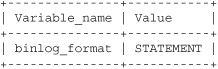
The replication method currently in use on the server is listed in the binlog_format server variable.

mysql> SHOW VARIABLES LIKE 'binlog_format';
t0305-01
1 row in set (0.08 sec)

To alter the replication method, set a new value for this variable, as shown, using the SET command with either GLOBAL or SESSION scope. Note that using GLOBAL scope requires a server restart for the change in method to take effect.

mysql> SET binlog_format = 'MIXED';
Query OK, 0 rows affected (0.02 sec)
mysql> SELECT @@SESSION.binlog_format;
+-------------------------+
| @@SESSION.binlog_format |
+-------------------------+
| MIXED                   |
+-------------------------+
1 row in set (0.00 sec)

mysql> SET GLOBAL binlog_format = 'ROW';
Query OK, 0 rows affected (0.00 sec)
mysql> SELECT @@GLOBAL.binlog_format;;
+------------------------+
| @@GLOBAL.binlog_format |
+------------------------+
| ROW                    |
+------------------------+
1 row in set (0.00 sec)